This course introduces students to mobile programming technologies for designing, developing, and publishing mobile applications across multiple platforms. It provides fundamental knowledge and techniques for leveraging device capabilities, adhering to current technologies and standards, implementing security measures, and working with various mobile operating system software development kits (SDKs). Emphasis is placed on building efficient, secure, and user-friendly mobile applications while fostering entrepreneurial and analytical skills. By the end of the course, students will be able to analyze mobile programming frameworks to support diverse online communities, build efficient and secure mobile applications for multiple devices, and demonstrate entrepreneurial skills in mobile application analysis. Teaching methods include lectures, laboratory sessions, and discussions, while assessments consist of tests, assignments, and group projects.
At the end of the course, students should be able to:
- Understand the concepts of mobile programming frameworks in support of a diverse online community.
- Develop a mobile application that is usable, efficient and secure on more than one device.
- Demonstrate entrepreneurial skills in the development of mobile application.
Course Syllabus
| Topic | Remarks |
|---|---|
| WEEK 1 (28/09/26-02/10/26) Chapter 1 – Introduction to Mobile Programming 1.1 Internet and networking 1.2 HTML and CSS 1.3 XML 1.4 Java 1.5 Mobile Apps architecture 1.6 Mobile Apps vs. Web Apps 1.7 Android vs. IOS | Start Entrance Survey (28 September) Lecture 1:: Ebooks Lab 1: Installation and develop my first app |
| WEEK 2 (05/10/26-09/10/26) Chapter 1 – Introduction to Mobile Programming 1.1 Internet and networking 1.2 HTML and CSS 1.3 XML 1.4 Java 1.5 Mobile Apps architecture 1.6 Mobile Apps vs. Web Apps 1.7 Android vs. IOS | Lecture 2: Introduction to Mobile Programming Lab 2: Installation and develop my first app |
| WEEK 3 (12/10/26-16/10/26) Chapter 2 – Introduction to Android Operating Systems 2.1 History 2.2 Features 2.3 Version 2.4 Android architecture | End Entrance Survey Lecture 2: Android Operating Systems Lab 3: XML and layout in Andriod |
| WEEK 4 (19/10/26-23/10/26) Chapter 2 – Introduction to Android Operating Systems 2.1 History 2.2 Features 2.3 Version 2.4 Android architecture | Start Lab assignment – 30% Lecture 3: Android studio Lab 4: UI view in Android |
| WEEK 5 (26/10/26-30/10/26) Chapter 3 – Android studio 3.1 Getting Started 3.2 First Application 3.3 Project Structure (manifests, java, res and build.gradle) 3.4 Activities, Fragment, Services, Intent and UI Widgets 3.5 Layouts 3.6 Containers 3.7 Menu | Lecture 4: Developing Application I Lab 5: Android widgets |
| WEEK 6 (02/11/26-06/11/26) Chapter 3 – Android studio 3.1 Getting Started 3.2 First Application 3.3 Project Structure (manifests, java, res and build.gradle) 3.4 Activities, Fragment, Services, Intent and UI Widgets 3.5 Layouts 3.6 Containers 3.7 Menu | Lecture 5: Developing Application II Lab 6: Andriod navigation |
| WEEK 7 (09/11/26-13/11/26) Chapter 4 – Developing Application I 4.1 Layouts (Linear Layout, Relative Layout) 4.2 UI Widgets (TextView, EditText, Button, ImageView, 4.1 4.3 RadioButton, CheckBox, Spinner, ScrollView) 4.4 Event Handling and Event Listener 4.5 Fragment and Intent 4.6 Toast (Simple Toast) 4.7 Containers (WebView) | Project briefing (Create groups) Submit lab assignment – 30% (5/12/2021) Start group project – 30% Lecture 6: Mobile Database Lab 7: Android database(SQLite) |
| WEEK 8 (16/11/26-20/11/26) Chapter 4 – Developing Application I 4.1 Layouts (Linear Layout, Relative Layout) 4.2 UI Widgets (TextView, EditText, Button, ImageView, 4.1 4.3 RadioButton, CheckBox, Spinner, ScrollView) 4.4 Event Handling and Event Listener 4.5 Fragment and Intent 4.6 Toast (Simple Toast) 4.7 Containers (WebView) Test 1 – (20%) | Lecture 7: Implementing CRUD Lab 8: SQLite CRUD |
| WEEK 9 (23/11/26-27/11/26) Chapter 5 – Developing Application II 5.1 Menu (Option Menu) 5.2 Navigation (Up Button/Back Button) 5.3 Data Storage (SharedPreference) 5.4 Date and Time (DatePicker, TimePicker) 5.5 Notification (Simple Notification) Chapter 7 – Implementing CRUD 7.1 Login and Logout and registration 7.2 Add, Retrieve, Update & Delete Operations 7.3 Reporting 7.4 Searching | Project proposal submission (17/12/2021) Lecture 8: Testing and Publishing Apps Lab 10: Testing and publishing |
| WEEK 10 (30/12/26-04/1/26) Chapter 5 – Developing Application II 5.1 Menu (Option Menu) 5.2 Navigation (Up Button/Back Button) 5.3 Data Storage (SharedPreference) 5.4 Date and Time (DatePicker, TimePicker) 5.5 Notification (Simple Notification) | Start Student Feedback Online (SuFO) Lecture 9: Revision activities Lab 10: |
| WEEK 11 (07/12/26-11/12/26) Chapter 6 – Mobile Database 6.1 Introduction to SQLite Database 6.2 Database design 6.3 Database connection 6.4 Database access using SQL Group project preparation | Lecture 11: Revision activities Lab 11: Project preparation |
| WEEK 12 (14/12/26-18/12/26) Chapter 6 – Mobile Database 6.1 Introduction to SQLite Database 6.2 Database design 6.3 Database connection 6.4 Database access using SQL Group project preparation | Lecture 12: Revision activities Lab 12: Project preparation |
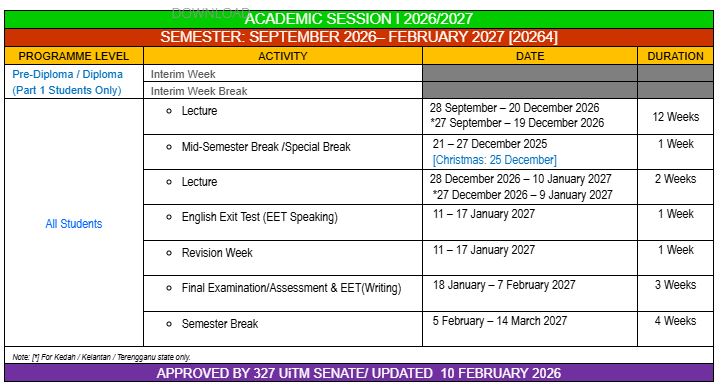
| (21/12/26 – 27/12/26) | Mid semester break |
| WEEK 13 (28/12/26-01/01/27) Chapter 7 – Implementing CRUD 8.1 Login and logout 8.2 Registration 8.3 Create, read, update, delete Group project preparation | Lecture 12: Revision activities Start Exit Survey (17-30 January 2021) Start Exit Student Feedback Online (SuFO (20/12/2021 – 6/2/2022) Lab 13: Project preparation |
| WEEK 14 (04/01/27-08/01/27) Chapter 7 – Implementing CRUD 8.1 Login and logout 8.2 Registration 8.3 Create, read, update, delete Testing and Publishing Apps – Mobile application and delivery – Testing mobile application – Application distribution Test 2 – (20%) | Lecture 14: Revision activities Test 2 – (2/1/2027) (40%) End Exit Survey End Exit Student Feedback Online (SuFO) Project preparation Lab 14: Project preparation |
| (09/01/27 – 17/1/2027) Group project presentation | Submit group project – 30% (31/1/2021) Group project presentation (3-4/2/2022) Study week |
SESI OKTOBER-MAC 2021