Lab Assignment : 30% Group Project : 30% Final test : 40% Total: 100% Passing grade : C ( 50 % )
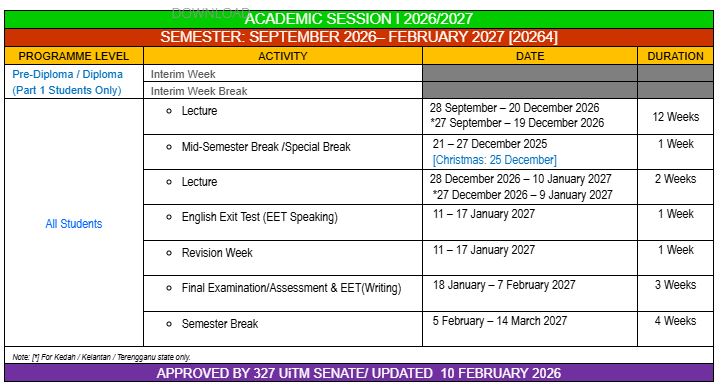
Final Test : 40% (05/1/2027)
Date: 05/1/2027 (Wednesday) Time: 10.15 – 11.15 am Duration: 2 Hours (excluding submission time 10 minutes) Chapter 1-7 Type: Part A – Objective- (20 questions) – 20 marks (Close book) Part B – Subjectives (2 short questions) – 30 marks (Open book for Part B (Question 2 only)
Just type your answer in the paper and attach it as .pdf file in UFuture.
Hint: Code the xml and java file.
GOOD LUCK 🙂
Lab assignment: 30% (5/12/2026)
This lab assignment is an individual assignment. Students can discuss and refer to any related resources as long as they manage to design and develop the mobile app by themselves. In this lab assignment, students are required to use Android Studio IDE.
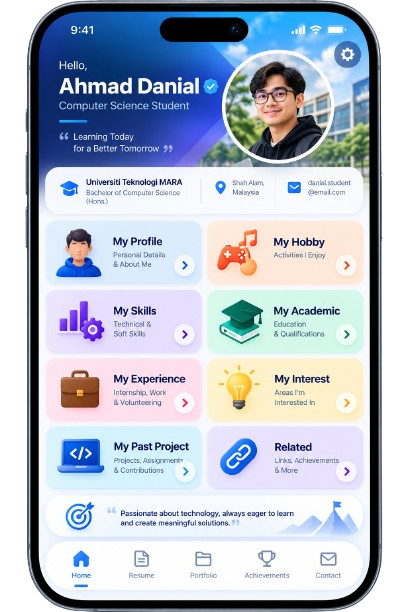
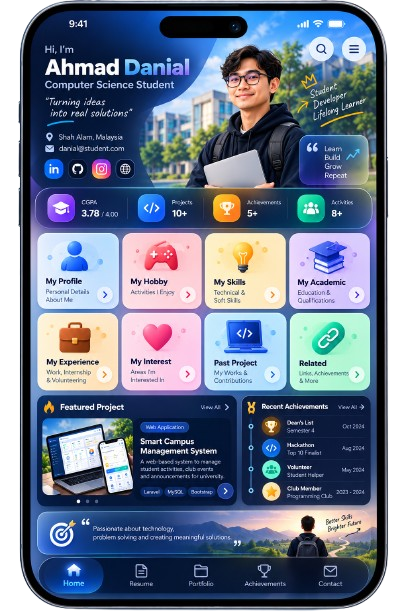
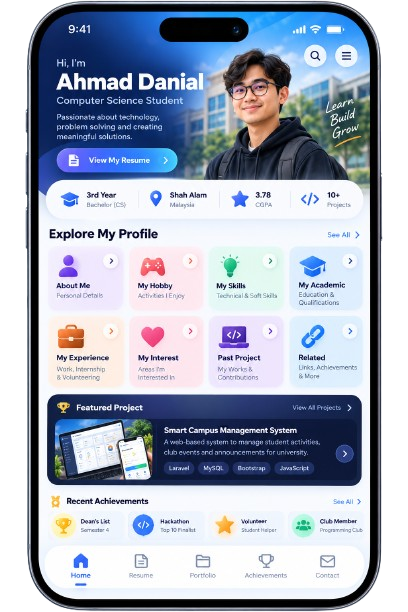
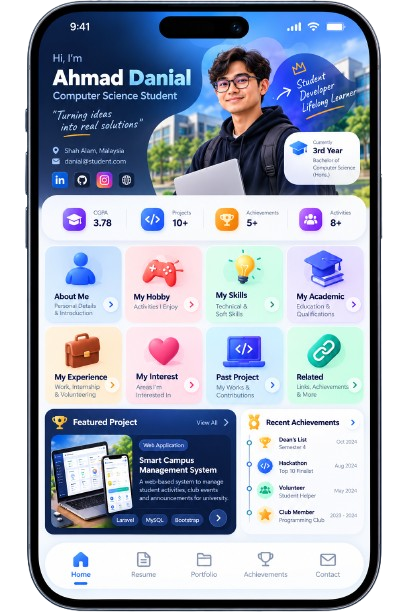
This lab assignment is about personal app. It is meant that students can share information about themselves such as:
About me
Skills
Hobbies
Skill
Academic
Experience
Interest
Past project
Note: Please use your own creativity to develop the above pages.
It also has quick links to personal social media platform.
App icon and splash screen should be included.
There are several elements to take into the consideration in developing the mobile app.
Navigate Drawer
TextView
Button/ImageButton
ListView
WebView
Imageview
Scrollview
Progress bar
Rating bar
Android toast
Alert dialog
Appendix: The example of the mobile application pages are shown as below:
What to submit:
Project files
Video of the app
Put both of the files in the google drive and share the link in the UFuture (I will create the assignment in UFuture later).
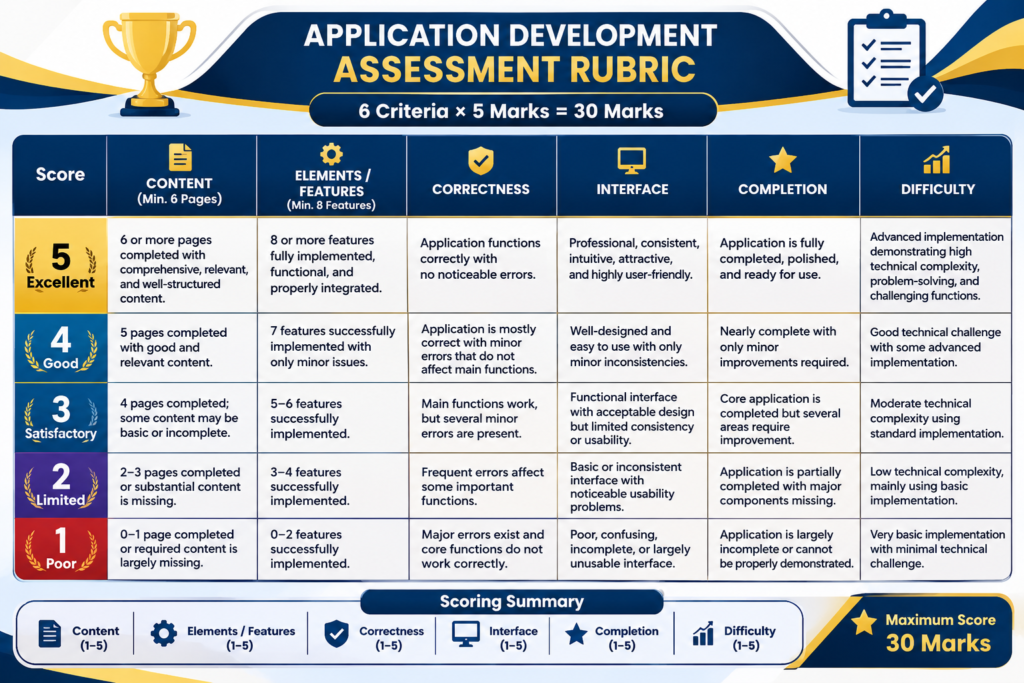
The evaluation rubric
Group project:
10%(proposal) – 17/12/2026
20%(Mobile App) – 31/1/2026
Group project requirement
This group project is especially designed as a platform for students to improve their soft skills such as logical thinking, critical thinking, problem solving, programming and esprit de corps. The ideal group size is 4 – 5 members. It is recommended that the group size is as small as possible. By doing this, perhaps each student will give full commitment to the project. This is to make sure that there is no sleeping partners in the group. A project leader is appointed and responsible to the success of the group.
The time duration of the group project is seven weeks starting from assigning the project title until the project presentation.
Each group is required to provide with the followings:
Proposal/report document (softcopy)
Project file mobile application (softcopy)
Report
Format:
In Power Point
Font type: Times New Roman / Arial
No. of slides: 10 – 15 slides
Cover page – course, group, project title, prepared by and prepared for
Content
Title
Problem statement
Objectives – 2 to 3 objectives
Scopes
Members’ particular details – ID and name & Job assignment
User interface design
Database design – ERD
Methods/techniques applied
Application
Please ensure that the mobile application adheres to the following conditions:
The mobile app has login & logout functions. Only the registered users can access the mobile app based on their authorizations.
The database is either SQLite or MySQL. For those who use MySQL database will be rewarded extra marks.
The CRUD functions for at least one table.
Produce a simple report from the database.
Implementation
Students must use Android Studio IDE to develop the mobile application.
Students may have a local host to locate the MySQL database server, in case they are using the MySQL database.
The mobile application is run on pc/laptop and viewed by using the android emulator/android device because the lecturer need to see the source code in order to evaluate the students’ understanding on the subject matter.
The evaluation rubric
Report
5 – 4 marks
3 – 2 marks
1 – 0 mark
1. Organization
The contents are organized and explained very well
The contents are less organized and explained
The contents are notorganized and explained at all
2. Contribution
All requirements and objectives are identified, evaluated and completed
All requirements are identified and evaluated but some objectives arenot completed
Many requirements and objectives are not identified, evaluatedand/or completed
Mobile App
5 – 4 marks
3 – 2 marks
1 – 0 mark
1. UserInterface
Interface is neat and well organized
Interface is reasonably neat
Interface is untidy and not organized
2. Run without error
Runs smoothly and without errors
Runs but with some errors
Still contain error or warning
3. Correctness
Application is according to theoriginal proposal and givescorrect output
Application follows the original partially or givessome incorrect output
Application is completely incorrect
4. Database
CRUD functions for at least one table without errors
CRUD functions for at least one table with some errors
No database used at all
The full marks are 30 marks in which 10 marks for the report and 20 marks for the mobile app.
This course introduces students to mobile programming technologies for designing, developing, and publishing mobile applications across multiple platforms. It provides fundamental knowledge and techniques for leveraging device capabilities, adhering to current technologies and standards, implementing security measures, and working with various mobile operating system software development kits (SDKs). Emphasis is placed on building efficient, secure, and user-friendly mobile applications while fostering entrepreneurial and analytical skills. By the end of the course, students will be able to analyze mobile programming frameworks to support diverse online communities, build efficient and secure mobile applications for multiple devices, and demonstrate entrepreneurial skills in mobile application analysis. Teaching methods include lectures, laboratory sessions, and discussions, while assessments consist of tests, assignments, and group projects.
At the end of the course, students should be able to:
Understand the concepts of mobile programming frameworks in support of a diverse online community.
Develop a mobile application that is usable, efficient and secure on more than one device.
Demonstrate entrepreneurial skills in the development of mobile application.
Course Syllabus
Topic
Remarks
WEEK 1 (28/09/26-02/10/26)
Chapter 1 – Introduction to Mobile Programming
1.1 Internet and networking 1.2 HTML and CSS 1.3 XML 1.4 Java 1.5 Mobile Apps architecture 1.6 Mobile Apps vs. Web Apps 1.7 Android vs. IOS
Chapter 1 – Introduction to Mobile Programming 1.1 Internet and networking 1.2 HTML and CSS 1.3 XML 1.4 Java 1.5 Mobile Apps architecture 1.6 Mobile Apps vs. Web Apps 1.7 Android vs. IOS
Chapter 3 – Android studio 3.1 Getting Started 3.2 First Application 3.3 Project Structure (manifests, java, res and build.gradle) 3.4 Activities, Fragment, Services, Intent and UI Widgets 3.5 Layouts 3.6 Containers 3.7 Menu
Chapter 3 – Android studio 3.1 Getting Started 3.2 First Application 3.3 Project Structure (manifests, java, res and build.gradle) 3.4 Activities, Fragment, Services, Intent and UI Widgets 3.5 Layouts 3.6 Containers 3.7 Menu
Chapter 5 – Developing Application II 5.1 Menu (Option Menu) 5.2 Navigation (Up Button/Back Button) 5.3 Data Storage (SharedPreference) 5.4 Date and Time (DatePicker, TimePicker) 5.5 Notification (Simple Notification)
Chapter 7 – Implementing CRUD
7.1 Login and Logout and registration 7.2 Add, Retrieve, Update & Delete Operations 7.3 Reporting 7.4 Searching
Chapter 5 – Developing Application II 5.1 Menu (Option Menu) 5.2 Navigation (Up Button/Back Button) 5.3 Data Storage (SharedPreference) 5.4 Date and Time (DatePicker, TimePicker) 5.5 Notification (Simple Notification)
Start Student Feedback Online (SuFO)
Lecture 9: Revision activities
Lab 10:
WEEK 11 (07/12/26-11/12/26)
Chapter 6 – Mobile Database
6.1 Introduction to SQLite Database 6.2 Database design 6.3 Database connection 6.4 Database access using SQL
Group project preparation
Lecture 11: Revision activities
Lab 11: Project preparation
WEEK 12 (14/12/26-18/12/26)
Chapter 6 – Mobile Database
6.1 Introduction to SQLite Database 6.2 Database design 6.3 Database connection 6.4 Database access using SQL